Updated guide · Last checked 29 October 2026
NBI Online Registration 2026: How to Create Your Account on clearance.nbi.gov.ph
NBI online registration means making a free account on the official portal, clearance.nbi.gov.ph. You fill in one form, type an OTP sent by SMS, and click an activation link in your email. Then you sign in and apply. Most people finish NBI registration online in 10 to 15 minutes.
- Tested on the portal
- Real screenshots
- Not the NBI website

Free to sign up. You pay only when you apply.
- FreeTo make an account
- 10 to 15 minTo register
- 12+ charactersFor your password
- 09 numberFor the OTP by SMS
Quick answer
- Open clearance.nbi.gov.ph and click I Agree on the Data Privacy notice.
- Fill in Register as New Account. Use your real name, a Philippine mobile number (09XXXXXXXXX), an active email and a 12+ character password.
- Enter the OTP from your SMS, then click Activate Account in the email.
- Sign in, complete your applicant information and click Apply for Clearance.
Making the account is free. You pay ₱160 only when you apply (NBI Citizen’s Charter 2025, checked 26 October 2026).
This is an independent guide. We are not the NBI, and the only official sign up site is clearance.nbi.gov.ph.
We tested the NBI online registration form ourselves on 25 October 2026 and checked every screen below against the live portal on 29 October 2026.
Before you start: what you need for NBI registration online
Get these five things ready before your NBI online registration. It saves you from the most common problems.
- A Philippine mobile number you have with you. The form asks for a number in the 09XXXXXXXXX format. The OTP comes by text to this number.
- An email you can open now. The activation link goes there. Keep it open in another tab.
- Your ID and PSA birth certificate. Copy your name and birth date exactly as they appear there.
- A password with at least 12 characters. The form does not say so until you submit it.
- About 15 quiet minutes. A slow OTP is the usual delay, so do not rush.
Which portal should you use?
| You are | Where to register |
|---|---|
| A new applicant | clearance.nbi.gov.ph → Register as New Account |
| A first time job seeker (free clearance) | firsttimejobseekers.nbi.gov.ph (a separate portal) |
| Renewing, and nothing changed | Sign in with your old account, or use NBI Clearance Online Renewal (for clearances from 16 October 2016 onwards) |
| Renewing, but a detail changed | Register again on clearance.nbi.gov.ph |
Portal links and renewal rule checked on clearance.nbi.gov.ph on 29 October 2026.
Watch the full walkthrough (3:15)
This video shows the whole NBI online registration flow on the real portal, from the sign up form to the payment slip. Pause it on any step you need.
How to register for NBI clearance online, step by step
The NBI clearance online registration steps below follow the portal screen by screen. Each step has a real screenshot. Personal details in the screenshots are blurred.
Part 1: Create your account
Step 1
Open the official NBI clearance homepage
Type the address yourself. Do not use links from ads or social media posts.

Step 2
Go to clearance.nbi.gov.ph and agree to the Data Privacy notice
A pop up explains how the NBI uses your data under the Data Privacy Act of 2012. Click I Agree to continue.

Step 3
Find Register as New Account
It is the form on the right side of the page. On a phone, scroll down to see it.
Step 4
Optional: Register Using Government ID
This shortcut fills in the form from an ID. You can skip it and type everything yourself.

Step 5
Optional: scan or upload your ID
If you used the shortcut, scan or upload a clear photo of your ID. Check every detail it fills in.

Step 6
Fill in your personal details
Choose your gender, civil status and birth date. Then type your first name, middle name and last name exactly as on your PSA birth certificate.

Step 7
Add your mobile number, email and password
Use a 09 number that can receive texts now. Type a password with at least 12 characters and type it again to confirm.
Tip from our test: On 25 October 2026, our editor’s shorter password was refused only after he pressed Sign Up. Use 12 or more characters from the start, with letters, numbers and a symbol.

Step 8
Check every detail before you sign up
Look at the spelling of your name, your birth date and your email. A wrong email means the activation link never reaches you.

Step 9
Accept the terms, complete the captcha and click Sign Up
Tick READ and ACCEPT TERMS OF SERVICES, finish the captcha, then press Sign Up once.

Part 2: Verify your account with the OTP and email
Step 10
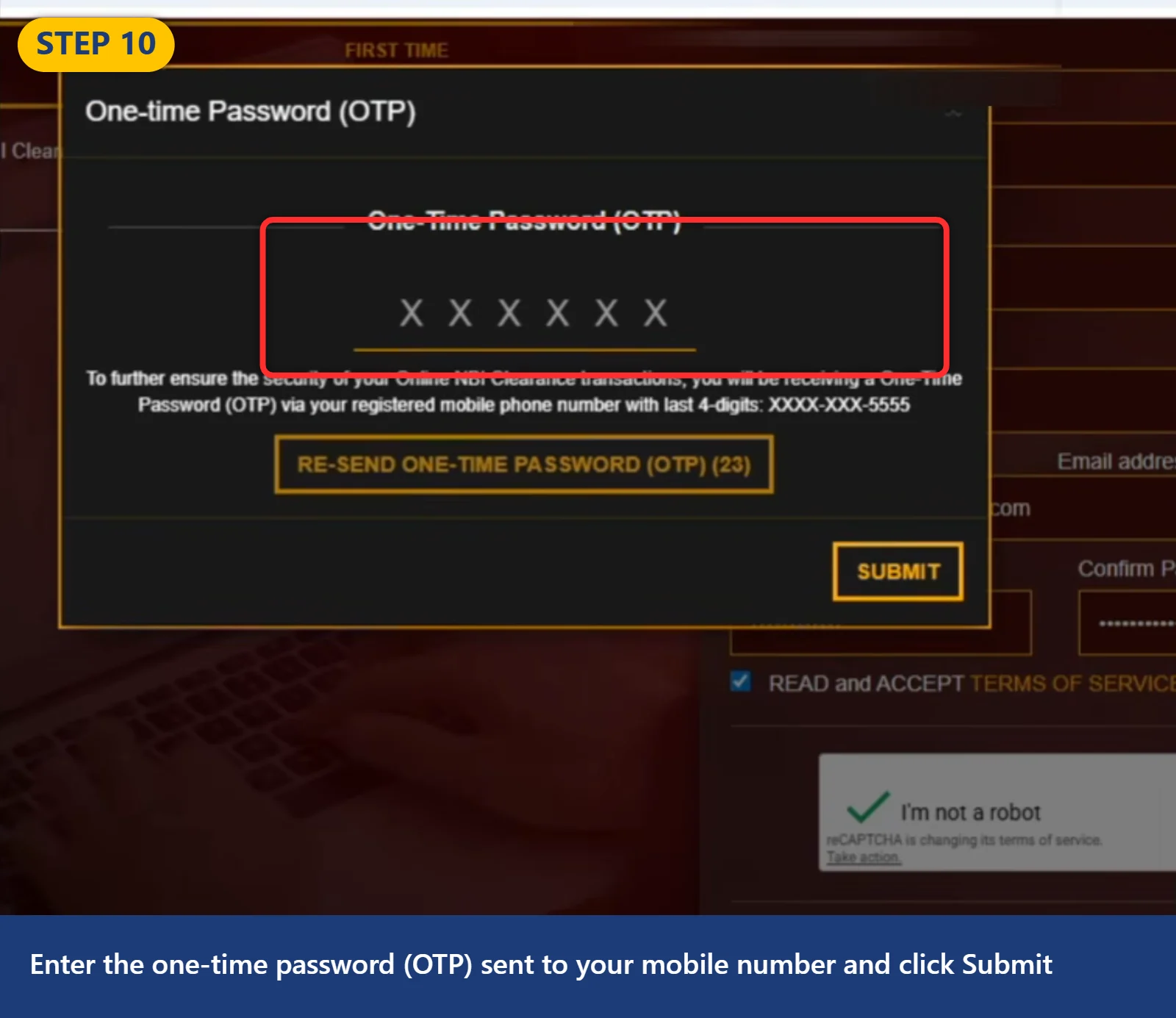
Enter the OTP sent to your mobile number
A one time PIN (OTP) arrives by SMS. Type it and click Submit. If it does not come, wait for the countdown and use the re-send option.
Stuck here? Check the number and your signal. Wait a few minutes before you re-send. Do not make a new account, because a second account with the same details causes more problems. See the fix table below.
Step 11
Read the activation message
The portal says an activation link was sent to your email. Leave the page open and go to your inbox.

Step 12
Open the email from NBI Online Services
Look in your inbox. If it is not there, check Spam, Promotions and Updates.

Step 13
Click Activate Account
This confirms your email. Use the newest email if you got more than one.
No email? Search your mail for “NBI”. Make sure you typed the email correctly in Step 7. Use the portal’s re-send option if it shows one. Do not register again with the same email.

Step 14
Your account is active
The portal shows that your account is activated, with a Login link. Your NBI registration online is now done.

Part 3: Sign in and fill in your applicant information
Step 15
Sign in
Use the Sign In box at the top of clearance.nbi.gov.ph with your email and password. Some users report that an OTP is asked again here.

Step 16
Choose Change Password Now or Not now
The portal may ask you to update your password. You can do it now or skip it.

Step 17
See your applicant information page
This is your profile. Most fields are still empty after sign up.

Step 18
Find the Apply for Clearance button
It sits on the right side of your profile. You will use it after your profile is complete.

Step 19
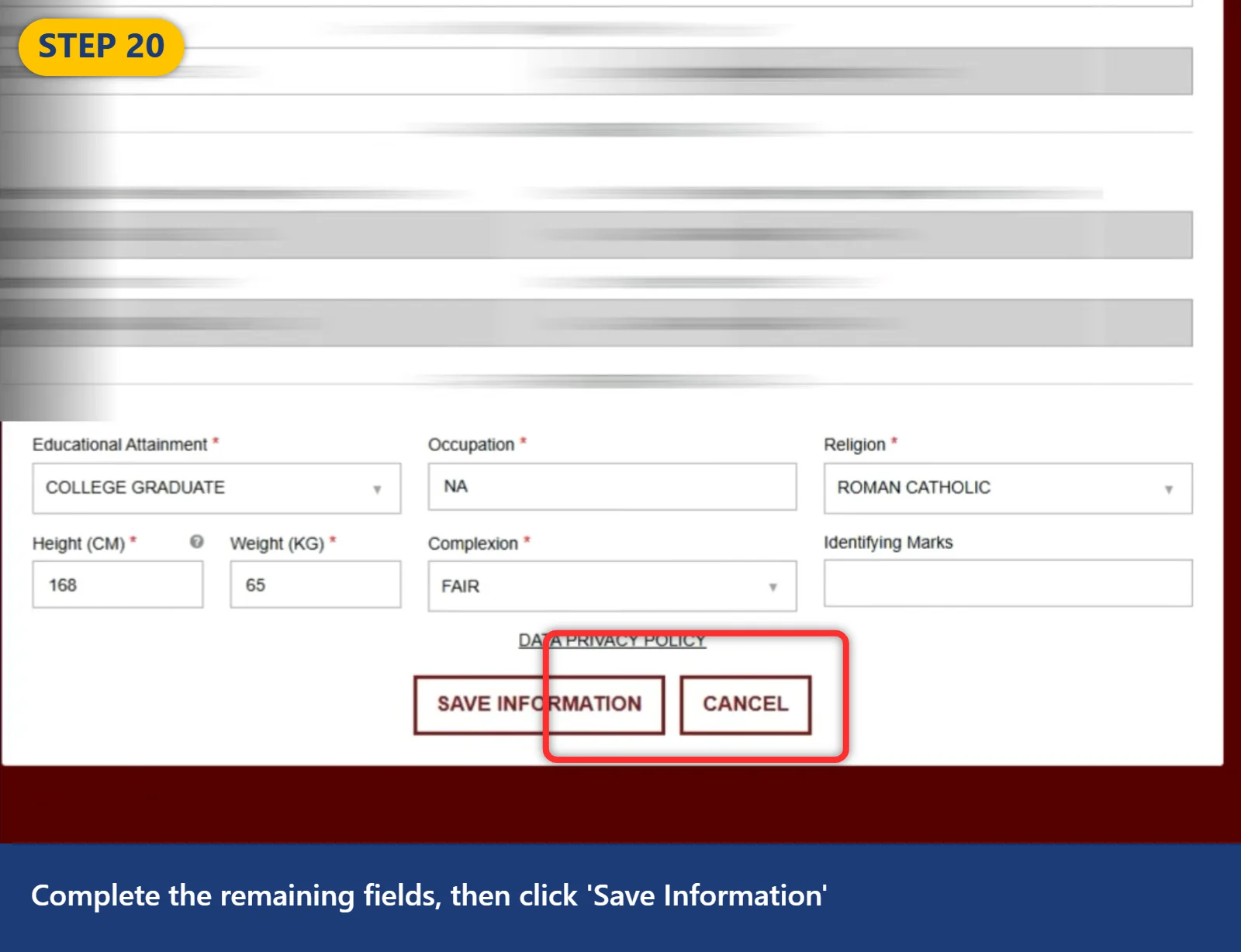
Fill in the missing fields
Fields with a star are required: address, birth place, parents’ names, height, weight, complexion and others.

Step 20
Click Save Information
Read everything once more before you save. Your details print on your clearance.
Part 4: Apply, choose a branch and pay
Step 21
Confirm your type of ID
Click Apply for Clearance. Pick the ID you will bring, type its number and click I Agree.

Step 22
Select your NBI branch
Choose the NBI clearance center you will visit. In 2026 there is no date or time to pick. This is normal.

Step 23
Your appointment date is set for you
After you pay, the portal sets your appointment date to the day you applied. The NBI gives a 15 day grace period once your payment is PAID (checked 26 October 2026).

Step 24
Choose a payment option
The portal lists banks, e-wallets and cash payment partners. Copy your reference number from this screen.

Step 25
Cash payment partners
You can pay over the counter at partners such as Bayad Center outlets.

Step 26
Pay with GCash
Choose GCash and follow the prompt. Pay the exact amount shown.

Step 27
Other e-wallets
Maya, ShopeePay and DragonPay also appear at checkout.

Step 28
Cash Payments
Pick Cash Payments if you want to pay at a store.

Step 29
Check the payment summary
The summary shows ₱130 for the clearance and ₱30 for the e-payment fee, so ₱160 in total. This matches the NBI Citizen’s Charter 2025 (checked 26 October 2026).

Step 30
At a 7-Eleven kiosk, choose Bills Payment, then NBI Clearance

Step 31
Enter your reference number, mobile number and the exact amount
Copy the reference number from the portal. Do not mix up the letter O and the number 0.

Step 32
Print the slip and pay at the cashier
Keep the receipt. Your status changes to PAID when the payment goes through.

All done. Visit your branch with your IDs, your reference number and your proof of payment. See what happens at the NBI branch.
NBI online registration form: field by field
The NBI clearance registration form has ten fields. Here is what to put in each one, checked on the live portal on 29 October 2026.
| Field | What to type | Avoid |
|---|---|---|
| Gender | Male or Female | Leaving it blank |
| Civil Status | Single, Married, Separated, Widow, Widower, Divorced, Annulled or Single Parent | Picking a status that does not match your documents |
| Birth Date | Year, month and day from your PSA birth certificate | A date that differs from your ID |
| First Name | Your full first name, plus suffix if you have one (Jr, III) | Short forms like “Ma.” for Maria |
| Middle Name | Your full middle name | Only an initial |
| Last Name | Your current last name | A name that does not match your ID |
| Mobile Number | An 11 digit number starting with 09 | A number you no longer use |
| An active email you can open now | Typos such as gmial.com | |
| Password | At least 12 characters | Short or easy passwords |
| Confirm Password | The same password again | A typo that does not match |
Name rules that save you trouble:
- Copy your name from your PSA birth certificate and your ID, letter by letter.
- If you are married and use your husband’s surname, use the name on your current ID and bring your PSA marriage certificate to the branch.
- If you have no middle name, bring your PSA birth certificate to show it.
Stuck on a step? Fix it here
These are the NBI online registration problems applicants report most, with what to do and what to avoid.
| Problem | Where it happens | What to do | Do not |
|---|---|---|---|
| OTP not arriving | Step 10 | Check the 09 number and your signal. Wait for the countdown, then re-send. Try again at a quieter hour. | Make a second account |
| OTP typed, screen does not move | Step 10 | Wait a minute, then refresh and sign in. Your account may already be saved. | Sign up again |
| OTP asked again at sign in and not arriving | Step 15 | Check that your old number still works. Wait and re-send. | Register a new account with the same details |
| Activation email missing | Steps 11 to 13 | Check Spam, Promotions and Updates. Search for “NBI”. Use the re-send option if the portal shows one. | Register again with the same email |
| Activation link does not open | Step 13 | Use the newest email. Copy the link into your browser. | Click old links many times |
| Password refused | Step 9 | Use at least 12 characters with letters, numbers and a symbol (our test, 25 October 2026). | Reuse a short password |
| Portal says your email or account is already taken (users also report “Unprocessable Entity”) | Step 9 | You already have an account. Sign in, or click Forgot Password? | Make another account |
| Forgot your password | Step 15 | Click Forgot Password? under Sign In and follow the email. | Share your password with anyone |
| Forgot which email you used | Step 15 | Search your inboxes for the NBI Online Services email. Then use Forgot Password?. | Guess and create new accounts |
| Wrong detail after you signed up | Steps 6 to 20 | Fix it in your applicant information before you save and pay. If you already paid, ask the NBI help desk or your branch. | Pay again to edit |
| First time job seeker page reloads with an error | FTJS portal | Users report it works again after a while. Try later. | Use paid “registration” services |
| Site is down or “updating” | Any step | Wait and try again later. We saw nbi.gov.ph offline ourselves on 29 October 2026. | Use look-alike sites |
| No Philippine number (abroad) | Step 7 | Use a 09 number that you control and that works where you are, or use the embassy route below. | Give your OTP to anyone |
After you register: what comes next
NBI online registration is only the first part. The next four steps happen on the same portal and at the branch.
- Apply. Click Apply for Clearance and confirm your ID. See the IDs the NBI accepts.
- Pick a branch. No date or time to choose in 2026. See how the appointment works now.
- Pay ₱160. See the fee and how to pay with GCash.
- Visit the branch. Photo, fingerprints and release. See what happens at the NBI branch.
First time job seekers: use the separate portal
If this is your first job and you want the free clearance under Republic Act 11261, do not use the regular sign up form. Go to firsttimejobseekers.nbi.gov.ph instead. Its form looks the same but also asks for your mother’s maiden name (checked 29 October 2026). You still visit an NBI office for your photo and fingerprints, and you bring a Barangay Certification and your signed Oath of Undertaking. The free clearance is given once.
Full guide: see our free NBI clearance for first time job seekers, with all 12 steps, the Barangay Certification rules and fixes.
Registering for someone else or from abroad
Helping a family member? You can type the form for them, but use their real name, their own mobile number and their own email. The OTP and the activation link go there. They must still go to the branch in person for photo and fingerprints.
Living abroad? The OTP needs a Philippine 09 number. If you do not have one, you can apply through a Philippine embassy or consulate with NBI Form No. 5 and send it by mail. See how to apply from abroad.
Stay safe: the real NBI registration site
- Many people search for “www nbi gov ph online registration”. The sign up form is not on nbi.gov.ph. It is on clearance.nbi.gov.ph, and first time job seekers use firsttimejobseekers.nbi.gov.ph.
- Look at the address bar before you type anything. Look-alike sites copy the NBI colors and seal.
- Making an account is free. Nobody needs to charge you to register.
- Never give your OTP or password to anyone, even someone who says they work for the NBI.
- NBI Guide PH never asks for your details or payments. We only explain the steps.
NBI online registration FAQ
How do I register for NBI clearance online in 2026?
Open clearance.nbi.gov.ph, click I Agree on the privacy notice and fill in Register as New Account. Use your real name, a 09 mobile number, an active email and a password of at least 12 characters. Enter the OTP from your SMS, click Activate Account in the email, then sign in and apply.
Why am I not getting the NBI OTP?
Most of the time the number is wrong, the signal is weak or the portal is slow. Check the 09 number, wait for the countdown, then use the re-send option. Many applicants reported slow OTPs in 2026. Do not make a new account while you wait, because a second account can block you later.
I did not get the NBI activation email. What do I do?
First check Spam, Promotions and Updates, and search your mail for “NBI”. Make sure the email you typed has no mistake. If the portal shows a re-send option, use it and open only the newest email. Do not register again with the same email, because the portal may say it is already taken.
What password does the NBI clearance portal accept?
Use at least 12 characters. In our test on 25 October 2026, a shorter password was refused only after we pressed Sign Up. The form did not warn us before. Mix letters, numbers and a symbol. Save the password somewhere safe, because you need it each time you sign in.
The portal says my email is already taken. What does that mean?
It means an account already uses that email, usually one you made before. Do not register again. Click Sign In and use your old password, or click Forgot Password? to reset it. If you can no longer open that email, contact the NBI using the help lines shown on the official portal.
I forgot my NBI password. How do I sign in?
Go to clearance.nbi.gov.ph and click Forgot Password? under the Sign In box. Enter the email you registered with and follow the link the portal sends. Choose a new password with at least 12 characters, then sign in. If you also forgot the email, search your inboxes for a message from NBI Online Services.
Is NBI online registration free?
Yes. Making an account on clearance.nbi.gov.ph costs nothing. You pay only after you click Apply for Clearance and pick a branch. The fee is ₱130 plus a ₱30 e-payment fee, or ₱160 in total (NBI Citizen’s Charter 2025, checked 26 October 2026). First time job seekers can get one clearance free.
How long does NBI online registration take?
About 10 to 15 minutes if the OTP and the email arrive quickly. Filling in your applicant information takes a few more minutes. Keep your ID, phone and email ready before you start. Most delays come from a slow OTP or a missing activation email, not from the form itself. This is our own estimate from testing.
What are the “Register Using Government ID” and “Register Using NBI Clearance” buttons?
They are optional shortcuts on the sign up page. Register Using Government ID fills in the form from an ID you scan or upload. Register Using NBI Clearance (2014 onwards) uses details from an old clearance. You can skip both and type the form yourself. Always check every detail they fill in.
Do I need a new account to renew my NBI clearance?
Not if your details are the same. Sign in with your old account, or use NBI Clearance Online Renewal on the portal for clearances from 16 October 2016 onwards. If any detail changed, even one letter, the portal says you must register again. Bring your PSA document if your name or civil status changed. Our NBI clearance renewal guide covers every option, including the eGovPH app.
Do first time job seekers register on the same portal?
No. First time job seekers use a separate portal, firsttimejobseekers.nbi.gov.ph, for one free clearance under Republic Act 11261. Its form also asks for your mother’s maiden name. You still go to an NBI office for photo and fingerprints and bring a Barangay Certification and a signed Oath of Undertaking.
Paano mag register sa NBI online?
Pumunta sa clearance.nbi.gov.ph at i-click ang I Agree. Punan ang Register as New Account gamit ang tamang pangalan, 09 mobile number, email at password na may 12 characters o higit pa. I-type ang OTP mula sa SMS, tapos i-click ang Activate Account sa email. Pagkatapos, mag Sign In at mag Apply for Clearance.
How we checked this guide
On 25 October 2026, Hassan tested the sign up form on clearance.nbi.gov.ph up to the OTP step. That is how we found the 12 character password rule and confirmed that the OTP comes by SMS. On 29 October 2026, we checked the live sign up form again. We confirmed every field name, the civil status list and the 09XXXXXXXXX mobile format. We also checked the Sign In and Forgot Password? links and the first time job seekers portal.
We did not finish a full NBI online registration with our own account. The screens after the OTP come from a June 2026 walkthrough of the same portal. Where we could not confirm the exact wording of a message, we say so instead of guessing.
How we keep it current: We review this guide every month and after any NBI announcement. Found something wrong? Email [email protected] or use our contact page.
Changelog
- 29 October 2026: First published. Live check of the sign up form, FTJS portal and Online Renewal link.
More NBI clearance guides
- NBI Clearance 2026: Appointment, Fee and Requirements The full 5 step process: sign up, choose a branch, pay ₱160 and visit once.
- NBI Clearance Renewal 2026 Renew online with delivery, in the eGovPH app or at a branch.
- NBI Clearance eGov App Renewal Renew on your phone in 11 steps, with fees and pick up or delivery.
Official links
- Official NBI clearance portal: clearance.nbi.gov.ph
- First time job seekers portal: firsttimejobseekers.nbi.gov.ph
- NBI How to Apply page: nbi.gov.ph
- Republic Act 11261: Supreme Court E-Library
Disclaimer: NBI Guide PH is an independent guide. We are not the National Bureau of Investigation and we are not linked to any government agency. We do not take applications or payments. Register only at the official portal, clearance.nbi.gov.ph. Steps and fees can change, so always confirm on official NBI pages. Read our full disclaimer.
Bookmark this NBI online registration guide. We check it every month so you always have the current steps.